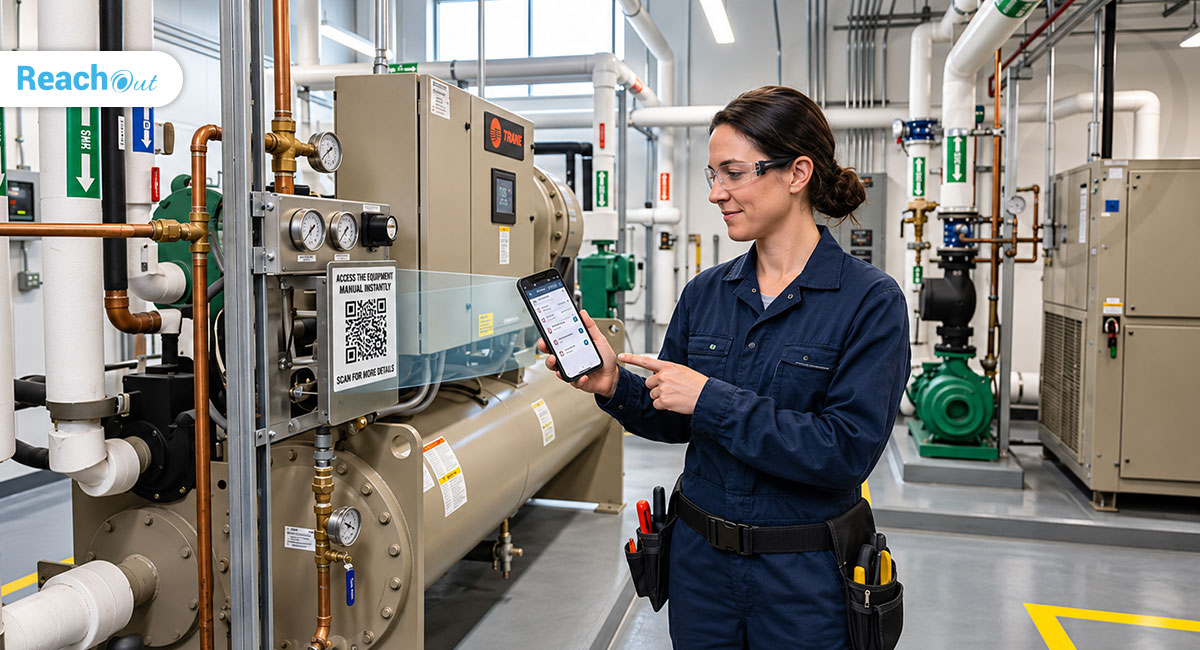
For field service companies, managing equipment doesn’t end after installation. Every customer location may have multiple assets that require regular servicing, inspections, repairs, and documentation. Keeping track of all this information through spreadsheets, paperwork, and scattered records can quickly become difficult.
That’s where asset management software comes in.
The right solution helps service businesses organize customer equipment records, maintain service history, connect assets with work orders, and give technicians access to important information while they’re in the field.
But with several software options available, how do you choose the right one?
In this guide, we’ll explore the essential features to look for, the benefits of asset management software, and how field service companies can choose a solution that fits their operations.
What Is Asset Management Software for Field Service Companies?
Asset management software helps businesses organize and manage equipment, machinery, and other assets installed at customer locations.
For field service companies, this means maintaining records of the equipment they install, inspect, repair, or maintain.
For example, an HVAC company may manage hundreds of air conditioning units across different customer locations. Each unit has its own equipment details, service records, manuals, and maintenance requirements.
Instead of searching through spreadsheets or paper files, technicians and service managers can access relevant asset information through a centralized system.
When connected with field service management software, asset records can also be linked to daily service operations, helping teams manage equipment and jobs in one place.
Why Do Field Service Companies Need Asset Management Software?
Managing customer equipment becomes more complicated as a service business grows. More customers mean more installations, more equipment records, and more service history to maintain.
Here are some common challenges asset management software can help address.
1. Scattered Equipment Records
Customer equipment details are often stored in different spreadsheets, documents, or emails. A centralized system makes it easier to organize and retrieve asset information.
2. Limited Access to Service History
Technicians may not know what work was previously performed on a particular piece of equipment. Keeping asset-related job records together helps them understand its service history.
3. Difficulty Managing Multiple Customer Locations
Businesses managing equipment across several sites need a consistent way to identify and track customer assets.
4. Time-Consuming Field Operations
When technicians have to contact the office for equipment details or search through paperwork, it can delay service work. Mobile access helps technicians find relevant information while on-site.
5. Disconnected Service Records
Connecting assets with work order management software helps businesses maintain a clearer record of the jobs and inspections associated with each asset.
7 Essential Features to Look for in Asset Management Software
Not every asset management solution offers the same capabilities. Before choosing one, consider whether it supports the following features.
1. Centralized Asset Records
The software should let you create and maintain records for equipment installed at different customer locations.
Look for the ability to organize assets by customer, location, category, and relevant equipment details.
2. Equipment Tracking Across Customer Locations
For businesses managing multiple installations, it is important to know which assets belong to each customer and where they are located.
A good solution should make it easy to find and review customer equipment records without searching through separate files.
3. Asset History and Job Tracking
Asset management becomes more useful when equipment records are connected to service activities.
Look for software that allows you to associate assets with work orders and inspections. This helps service teams access relevant job information and understand the work previously performed on an asset.
4. Document and Manual Management
Equipment often comes with manuals, technical documents, and other important files.
Choose a platform that allows teams to upload and access relevant asset documents. This can help technicians find the information they need during field visits.
5. Mobile Access for Field Technicians
Technicians should be able to access asset information while working at customer locations.
Mobile capabilities such as viewing asset details, registering equipment, and capturing asset images can make field operations easier.
6. Reporting and Asset Insights
Service managers need visibility into the equipment their teams manage.
Look for reporting capabilities that help review asset records, related jobs, and service activity.
7. Integration With Field Service Operations
Asset management shouldn’t operate in isolation.
A solution that connects asset records with scheduling, work orders, inspections, and other service activities can help businesses manage their operations more effectively.
Best Asset Management Software for Field Service Companies: What Should You Compare?
When evaluating software, don’t focus only on the number of features. Consider how well each solution supports your actual service workflows.
Use these criteria when comparing platforms:
| Evaluation Criteria | What to Look For |
|---|---|
| Asset records | Ability to organize equipment by customer and location |
| Equipment tracking | Easy access to customer asset information |
| Service history | Links between assets, work orders, and inspections |
| Document management | Storage and access for manuals and asset-related documents |
| Mobile functionality | Technicians can view and register assets from the field |
| Reporting | Reports and visibility into asset-related activities |
| Scalability | Suitable for growing teams and multiple locations |
| Pricing | Features and user limits that fit your business requirements |
The best solution depends on your business size, industry, number of customer locations, and the way your technicians work.
For example, a small installation company may need basic customer asset records, while a larger maintenance business may require mobile asset registration, document access, reporting, and detailed asset history.
How ReachOut Helps Field Service Companies Manage Assets
ReachOut offers asset management capabilities as part of its field service management platform.
Rather than maintaining customer equipment information separately, businesses can organize assets and connect them with their service operations.
Here’s what the platform supports.
Organize Customer Assets
Create and manage customer assets through the web portal. Businesses can categorize equipment and maintain asset records associated with individual customers and sites.
Connect Assets With Work Orders and Inspections
Link assets to work orders and inspections to keep relevant service activities associated with the equipment.
Give Technicians Mobile Access
Technicians can view asset information through the mobile app. Depending on the subscription plan, they can also register new assets at customer sites and capture asset images during maintenance visits.
Manage Asset Documents
Premium and Ultimate users can upload and manage asset-related documents and manuals, making important equipment information more accessible to field teams.
Access Asset History and Reports
Higher-tier plans provide detailed asset history, related jobs, image galleries, document access, and asset reporting.
These capabilities help service businesses maintain organized customer equipment records and give field teams better access to asset information.
Learn more about ReachOut Asset Management.
Which ReachOut Plan Includes Asset Management?
ReachOut provides asset management capabilities across multiple subscription plans, with additional functionality available in higher tiers.
| Feature | Free | Standard | Premium | Ultimate |
|---|---|---|---|---|
| Create and manage customer assets | ✓ | ✓ | ✓ | ✓ |
| Organize assets by category | ✓ | ✓ | ✓ | ✓ |
| Link assets to work orders and inspections | ✓ | ✓ | ✓ | ✓ |
| View asset lists on mobile | ✓ | ✓ | ✓ | ✓ |
| Manage asset documents and manuals | — | — | ✓ | ✓ |
| Register assets through the mobile app | — | — | ✓ | ✓ |
| Capture asset images through mobile | — | — | ✓ | ✓ |
| Detailed asset history and reporting | — | — | ✓ | ✓ |
Which Industries Can Benefit From Asset Management Software?
Asset management software can support businesses that install, inspect, repair, or maintain equipment at customer locations.
Some examples include:
- HVAC companies: Manage air conditioning units, heating systems, and other installed equipment. Dedicated HVAC service software can also help connect equipment records with daily service operations.
- Fire and safety companies: Organize records for fire extinguishers, alarm systems, and safety equipment.
- Security and alarm companies: Track installed CCTV cameras, access control systems, and security equipment.
- Facilities management companies: Maintain equipment records across commercial buildings and customer sites.
- Equipment installation and maintenance companies: Keep track of installed machinery and related service activities.
The common requirement across these industries is simple: businesses need an organized way to manage the equipment they service.
How to Choose the Right Asset Management Software
Before investing in a platform, ask these questions:
- Can I manage assets across multiple customer locations?
- Can I connect equipment records with work orders and inspections?
- Can technicians access asset details through a mobile app?
- Does the software support asset documents and images?
- Can I review asset-related service history?
- Does the pricing match my team’s size and requirements?
- Can the platform support my business as it grows?
Compare your answers against the features offered by each provider. A solution that fits your existing service workflow is often more valuable than one with a long list of features you may never use.
Final Thoughts
Managing customer equipment is an ongoing responsibility for field service businesses. As the number of installations and service locations grows, relying on spreadsheets and disconnected records becomes increasingly difficult.
The right asset management software can help organize equipment information, connect assets with service activities, and give technicians access to the records they need.
If you’re looking for a solution that brings customer asset management and field service operations together, explore ReachOut. Its asset management capabilities help businesses organize customer equipment, link assets with work orders and inspections, and manage asset information through web and mobile applications.
Ready to manage your customer assets more efficiently?
Explore ReachOut Asset Management and start your free trial.
Frequently Asked Questions
1. What is the best asset management software for field service companies?
The best software depends on your business requirements. Look for a solution that supports customer asset records, equipment tracking, service history, mobile access, document management, and integration with work orders and inspections.
2. How does asset management software help maintenance companies?
It helps maintenance companies organize equipment records, access asset-related documents, track service activities, and give technicians the information they need when visiting customer locations.
3. What is the difference between asset management software and equipment tracking software?
Equipment tracking software primarily focuses on identifying and locating equipment. Asset management software can offer broader capabilities, including asset records, documents, service history, and connections with work orders and inspections.
4. Can field technicians manage assets using a mobile app?
Yes. Depending on the software and subscription plan, technicians can view asset details, register new equipment, capture images, and access relevant documents through a mobile application.
5. Is asset management software useful for HVAC companies?
Yes. HVAC companies manage equipment such as air conditioning units, heating systems, and other installed assets across customer locations. Asset management software helps organize equipment details and related service records.
6. Can asset management software integrate with work order management?
Many field service platforms allow businesses to connect customer assets with work orders and inspections. This helps maintain a more organized record of service activities associated with each asset.
7. Does ReachOut offer asset management features?
Yes. ReachOut includes asset management capabilities that allow businesses to create and manage customer assets, link them to work orders and inspections, and give technicians access to asset information through its mobile app. Advanced capabilities such as asset documents, images, detailed history, and reporting are available in Premium and Ultimate plans.
Digitize your field service operations from scheduling to invoicing with ReachOut. Connect your technicians with the companion mobile app to execute jobs and reduce paperwork in the field. Try ReachOut now and give your customers the fast and quality service they deserve.
Get Started

Liji Raj
Liji is a passionate enthusiast in field service management, bringing a wealth of knowledge and enthusiasm to the industry. With a keen interest in optimizing service operations and improving field service efficiency, Liji is committed to sharing insights and best practices that empower businesses to excel in their service delivery.
More posts by Liji Raj